


Workflow
Catalog
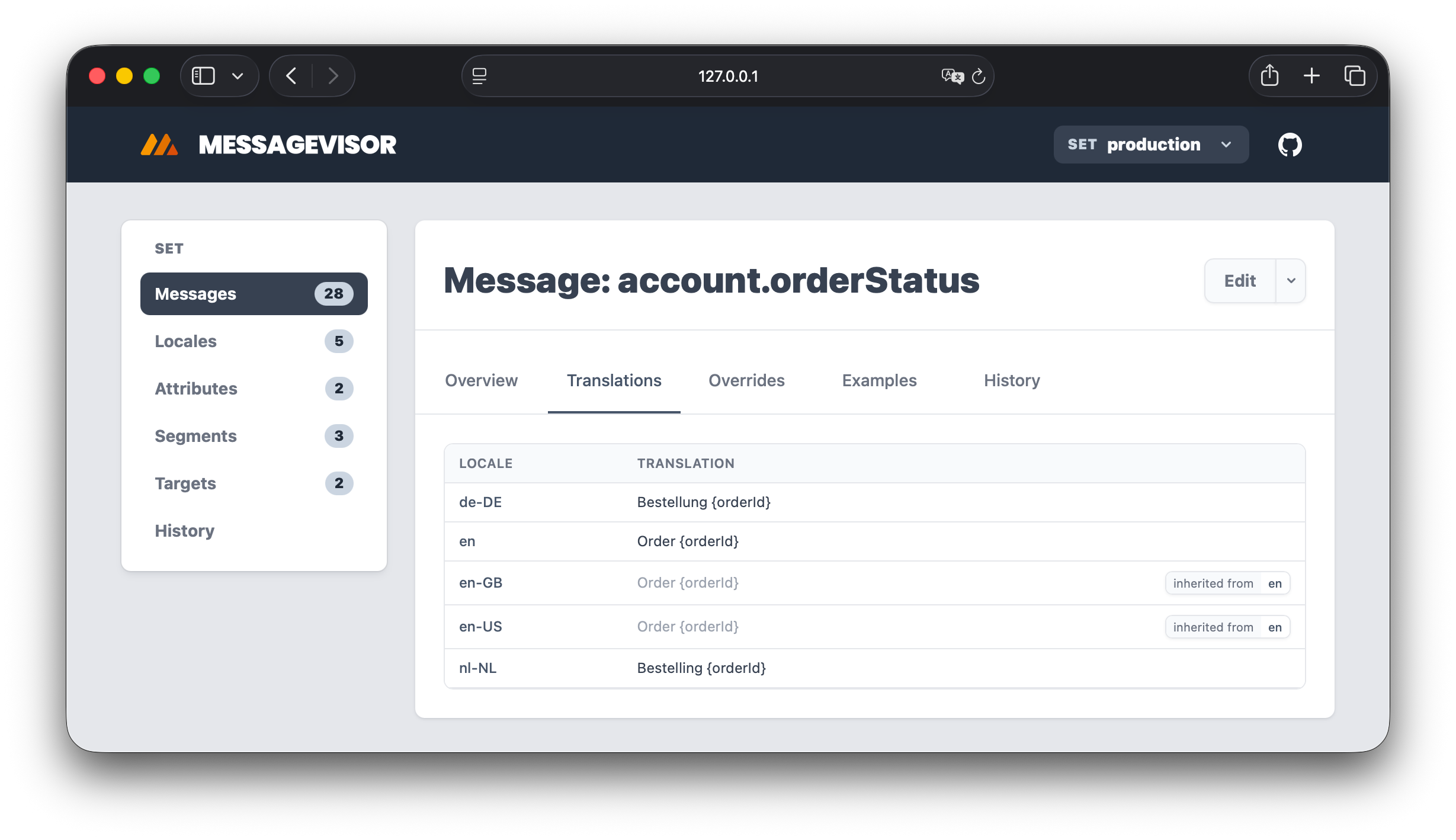
The catalog is a browsable view of your Messagevisor project: definitions, their relationships, history, examples, and generated views. It is the easiest way to review a project with other humans in a visual way.
Preview#
From an example project:
Main commands#
$ npx messagevisor catalog # run in dev mode$ npx messagevisor catalog --port=3100$ npx messagevisor catalog --with-translation-search$ npx messagevisor catalog --with-duplicates$ npx messagevisor catalog --set=staging --set=production$ npx messagevisor catalog export # static export to catalog/ directory$ npx messagevisor catalog export --with-translation-search$ npx messagevisor catalog export --with-duplicates$ npx messagevisor catalog export --set=production$ npx messagevisor catalog export --blockSize=524288$ npx messagevisor catalog serve # serve the static catalog locally$ npx messagevisor catalog serve --port=3100| Command | Description |
|---|---|
catalog | Run locally so it auto updates as you edit files |
catalog export | Generate static catalog files on disk (preferably in CI) |
catalog serve | Serve the static catalog locally |
Both catalog and catalog serve use port 3000 by default. Pass --port=<number> or -p <number> when that port is already in use.
Sets#
For sets-based projects, the catalog includes all sets by default.
If you only want to generate the catalog for specific sets, pass --set=<name>. You can pass it more than once:
$ npx messagevisor catalog --set=staging --set=production$ npx messagevisor catalog export --set=productionThe generated catalog remains set-aware, so the top navigation still shows the set switcher when the project uses sets, even if the export contains only one selected set.
In the set switcher, set names starting with dev appear first, set names starting with prod appear last, and other set names appear alphabetically in the middle.
Large projects#
Catalog indexes are compact by default. The index is split into a small core layer for keys and filters, with descriptions and display metadata loaded after the list can render. Message details and per-entity history are stored in content-addressed blocks, while aggregate history uses compact commit and entity key dictionaries. In set based projects, set history is canonical and the project History page merges those timelines lazily in the browser, avoiding a second materialized copy. Locales, targets, segments, and attributes remain individual files. History blocks load lazily when you open an entity's History tab.
$ npx messagevisor catalog$ npx messagevisor catalog export$ npx messagevisor catalog export --blockSize=524288Message blocks are deterministic and use short content hashes. The default block size is 256 KiB. Set catalogBlockSize in messagevisor.config.js to tune the project default:
module.exports = { catalogBlockSize: 262144,};Use --prettyOutput only when inspecting generated JSON locally. Compact output is the default and is substantially smaller on disk and over a static host. Catalog detail blocks use short content hashes and can be cached immutably, while indexes and their layers remain revalidatable. catalog serve serves the output that already exists and does not generate or change Catalog data.
When hosting an export, serve content-addressed message and history blocks with long-lived immutable caching. Keep manifest.json, index.json, the index/*.json layers, history/commits.json, history/keys.json, aggregate history pages, and ranges.json revalidatable so changes become visible immediately. The Catalog API expands compact history blocks back into the same history entries shown by the UI and continues to read older page based history exports.
Translation search#
By default, catalog export skips the translation-value search index. This keeps generation faster for large projects with many messages, locales, and overrides.
If you want message list search to support translation:"keyword" queries, opt in when generating the catalog:
$ npx messagevisor catalog --with-translation-search$ npx messagevisor catalog export --with-translation-searchcatalog serve only serves an already generated catalog. If the catalog was exported with translation search enabled, the message list shows the translation:"keyword" search hint and can search translation values. Otherwise, that hint is hidden and message search stays focused on keys and metadata.
Duplicate reports#
By default, catalog export skips duplicate translation reports. This avoids running duplicate detection for every locale when you only need the browsing UI.
If you want locale pages to include a Duplicates tab, opt in when generating the catalog:
$ npx messagevisor catalog --with-duplicates$ npx messagevisor catalog export --with-duplicatescatalog serve only serves an already generated catalog. If the catalog was exported with duplicate reports enabled, each locale page shows duplicate resolved translation values in its Duplicates tab. Otherwise, that tab is hidden. You can still run find-duplicates any time for a terminal audit.
Tests on entity pages#
Message, Segment, Locale, and Target pages include a Tests tab for test specifications that reference the entity. It shows authored and applied assertion counts, matrix case values, effective context, input values, flags, variations, formats, and expectations. Each applied assertion has a shareable permalink. Runtime-specific expectations remain visible rather than being hidden behind the common expectation.
Entity titles also include a copy control. Use it to copy a message, locale, segment, attribute, target, or test key without selecting text manually.
Routing behavior#
By default, the catalog uses browser routing, assuming it is hosted on the root of (sub)domain.
That means:
- URLs are clean
- deep links do not include
# - refreshes on deep routes work as long as the host serves
index.htmlfor unmatched app routes
If you need hash routing instead, opt in explicitly:
$ npx messagevisor catalog export --hashRouter$ npx messagevisor catalog serve --hashRouterUse hash routing when:
- your host cannot fall back to
index.html - you want static routing behavior without server-side rewrite support
What the catalog shows#
The catalog includes:
- messages, locales, attributes, segments, and targets
- entity relationships
- translations, overrides, formats, and history
- set-aware views for sets-based projects
- locale and message examples
- locale duplicate translation reports when generated with
--with-duplicates - permalinkable example rows and translation rows where supported
- locale direction metadata, including RTL-aware rendering for translated content
- translation workflow status and stale-source indicators when
translationStatesare authored
Why use the catalog#
The catalog is useful for:
- code review
- onboarding teammates
- sharing deep links to a specific message, override, translation row, or example
- finding duplicate translation values for a locale when generated with
--with-duplicates - comparing locale and target behavior without running ad hoc CLI commands repeatedly
For product managers, content designers, localization leads, and legal reviewers, the catalog is the human-readable layer over the same definitions engineers validate in CI. It lets reviewers see copy, context, examples, and targeting rules without needing to understand every YAML field.
Review workflow#
A practical catalog review usually looks like this:
- run
npx messagevisor catalogwhile authoring - open the message, locale, or target being changed
- inspect translations, overrides, examples, and related segments
- export, host, and share deep links in the pull request for reviewers
- run tests before merging
For hosted documentation or release review, generate the static catalog with catalog export and publish it next to the built datafiles or as a CI artifact.
This is meant to be private for your organization, and not shared with the wider world.
Export and deployment notes#
The catalog is a generated artifact. Treat it like build output:
- regenerate when project content changes
- publish static files if you want a hosted catalog
- prefer browser routing when your host supports SPA fallback routes